
Reporting · Archive · Billing
From the time log to the signed service ticket.All kept in your own archive.
RigRAB is the reporting, archiving and billing system for contractors who work on wells. Your rig crew writes the daily report. The rig manager approves it and sends it to the client. Every report goes into your company’s project archive.
See what your screens will look like, how quickly the archive finds things, and how a daily report becomes a signed service ticket.
- Smart reporting
- Time log with IADC codes, contract rates and NPT, in an adjustable template for each type of work.
- Smart & secure archive
- A modern archive of every report, schematic and attachment. Smart search finds any well, tool or code. We move your existing archive in too.
- Seamless billing
- Quantities from approved reports, prices from the confirmed contract. No retyping.
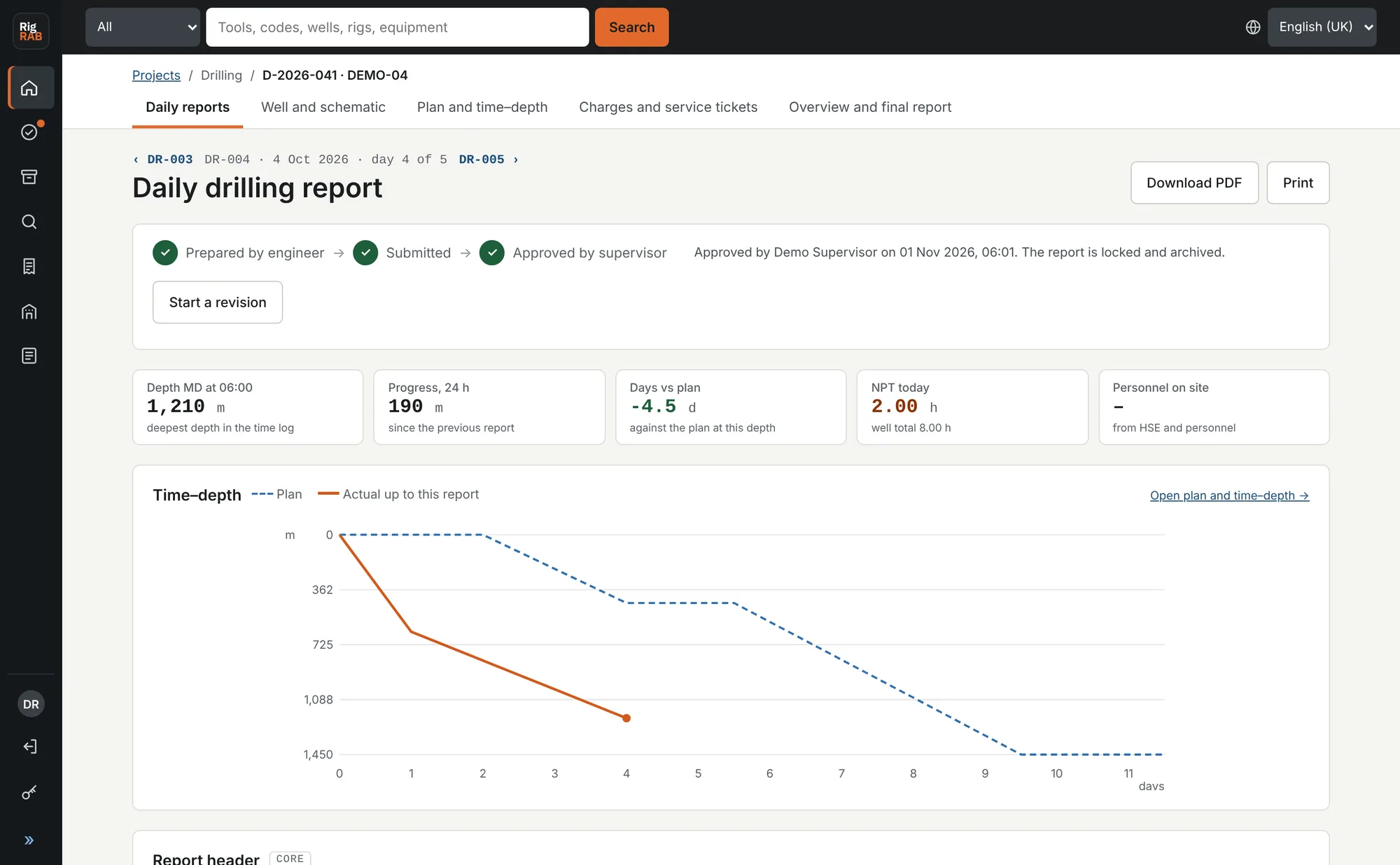
One system for the rig, the workover unit and the service crew.
Drilling
Daily drilling report with mud, BHA and casing, a time–depth chart against plan, and the wellbore schematic.
Workover
Workover report with completion, barriers and equipment pulled or run, shown on the schematic.
Well services
One job report whose service block and charge items change with the service line.
Smart reporting
A daily report the crew can fill in on site
Each line of the time log carries the activity code, the contract rate and the NPT flag. That is what makes the report searchable later and billable at the end of the month.
- Adjustable templates for each type of work. Add or remove modules for the day.
- IADC activity codes with sub-codes, and rate codes from your contract.
- Productive time, NPT and hours by rate are added up as you type.
- Metric or imperial units, set for the company.
- Submit, approve or return with a comment. Approved reports are locked.
- PDF of the day, the whole job or the final well report.
Time log
CORE| From | To | Hours | Activity code | Rate | NPT | Description |
|---|---|---|---|---|---|---|
| 06:00 | 11:30 | 5.50 | 2.1 · Rotary drilling | OP | Drilled 8 1/2" hole with PDC bit and mud motor | |
| 11:30 | 12:00 | 0.50 | 5.1 · Circulate | OP | Circulated bottoms up | |
| 12:00 | 14:00 | 2.00 | 8.2 · Mud pumps | REP | NPT | Repaired mud pump MP2 |
| 14:00 | 06:00 | 16.00 | 2.1 · Rotary drilling | OP | Drilled ahead |
Total 24.00 hProductive 22.00 hNPT 2.00 hOperating 22.00 h · Repair 2.00 h
Smart & secure archive
Every well you have worked on, with smart search
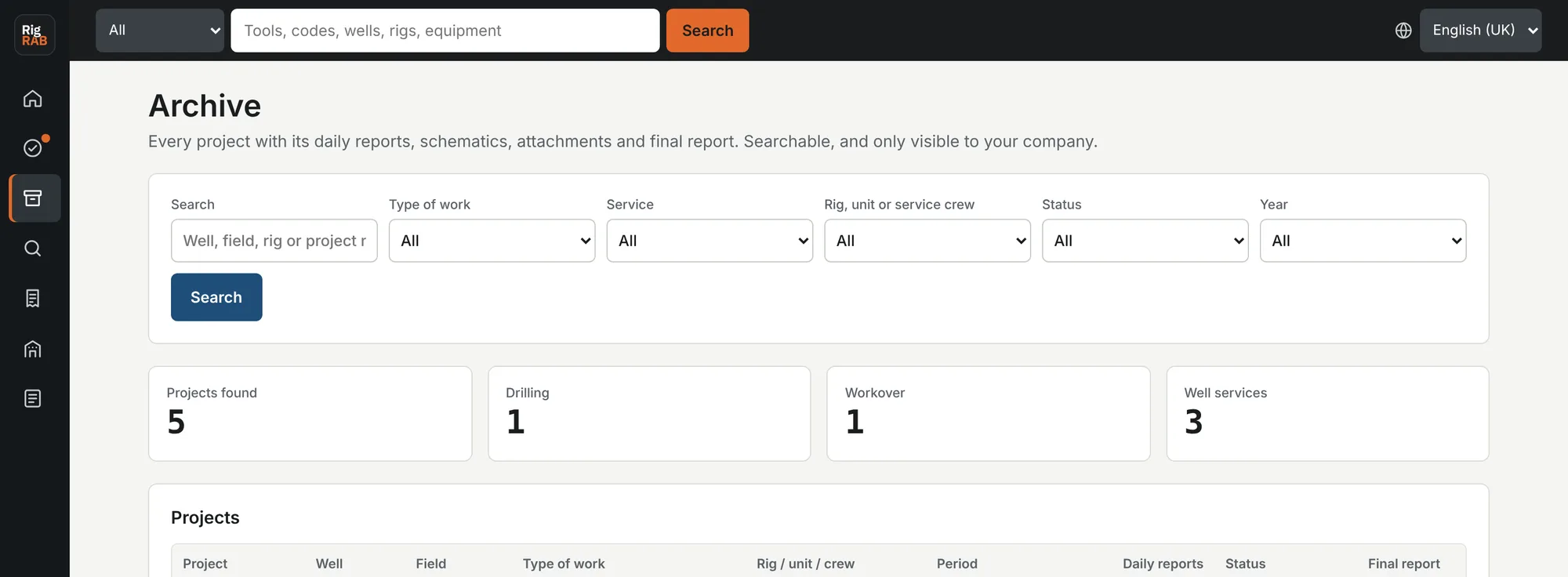
RigRAB keeps a modern, structured archive of your projects: daily reports, schematics, attachments and final reports. Find any job by well, field, rig, tool or activity code.
- Smart search across all reports that also understands synonyms and abbreviations.
- Tools and equipment are tagged in every report, so you can see where each one has run.
- Filter by type of work, service line, unit, status and year.
- Changes to an approved report go through a revision, and the history is kept.
- Always available: a permanent, reliable and secure record of every job your company has done.
Archive migration
Bring your existing archive with you
Daily reports in Excel, final well reports in PDF, files in the office drawer. We move them into RigRAB, so the whole history of your company sits in one searchable archive.
Daily reports become records
Your old daily reports are imported line by line: date, times, activity codes, rate, NPT, depth and description. Search and tool tags work on them like on new reports.
Documents filed by well
Final well reports, programmes, schematics, service company reports and tickets are filed by well and project, and the text inside them is searchable.
Scanned and searchable
Paper files are scanned, made searchable and filed the same way. Your originals stay with you.
You check and confirm everything we importOne-off service, quoted after we see a sampleHandled under a data processing agreement
Seamless billing
The service ticket writes itself from approved reports
The engineer never types money. At month end RigRAB takes the hours and items from approved reports and prices them from the contract your manager confirmed.
- Repair hours above the monthly allowance move to zero rate automatically.
- The rig or area manager approves the ticket before it leaves.
- Send it through the client portal for signature, as an Outlook draft or from company mail.
- PDF and Excel, with the daily reports attached if the client wants them.
- Your ticket form is chosen per project and remembered.
Service ticket · October 2026
| Rate | Description | Hours | EUR/h | Amount (EUR) |
|---|---|---|---|---|
| OP | Operating | 654.00 | 410.00 | 268,140.00 |
| STBY | Standby | 36.00 | 290.00 | 10,440.00 |
| REP | Repair, in allowance | 24.00 | 410.00 | 9,840.00 |
| ZERO | Repair above allowance | 6.00 | 0.00 | 0.00 |
| Total excl. VAT | 720.00 | 288,420.00 | ||
One report, three steps
Everyone works on the same record, at the step that is theirs
Roles and approval steps adjust to how your company is organised. Your client gets a separate client portal to read approved reports and sign service tickets.
- Rig personnel
Writes and submits
Fills in the time log, modules, items used and attachments for the day.
- Rig manager
Approves or returns
Approves the report and sends it to the client, or returns it with a comment.
- Client company man
Reads and signs
Reads approved reports and signs service tickets in the client portal.
Security and data
Your reports stay yours
Secure hosting
Encrypted connections over HTTPS and firewalled servers in professional data centres.
Separated by company
Every record belongs to one company. Users only ever see their own company's data.
Locked once approved
Approved reports cannot be edited in place. A revision keeps the earlier version and the reason.
AI under your control
AI is off until you switch it on. It runs on Microsoft Azure OpenAI, where your reports are not used to train models and are not shared with the model provider. Every feature also works without AI.
Nightly backups
The database and attached files are backed up every night.
Your data, your files
Reports, tickets and final reports export to PDF, and tickets to Excel, whenever you need them.
Pricing
Monthly packages by working unit, archive by the year
A working unit is a rig, workover unit or service crew. It counts in a month only when it has at least one daily report, so idle units cost nothing.
Start
1–2working units a month
For a single rig or a small service company.
Growth
3–5working units a month
For contractors with several units in the field.
Fleet
6–15working units a month
For larger fleets across several clients and fields.
Enterprise
16+working units a month
A tailored offer, with your own report and ticket forms set up for you.
Archive service, billed yearly by stored data
Reports, schematics, attachments and final reports, searchable and backed up every night. The archive stays open even when you pause a package.
Archive migration, one-off
We import your Excel daily reports and file your PDFs and scanned paper archive by well and project. Quoted after we see a sample of your archive.
All packages include every feature: daily reports, archive search, service tickets and the client portal. Prices in EUR or USD on request.
Modernise your drilling, workover or well services company.
One software for daily reporting, billing and a smart, secure archive. Tell us how many units you run and we will send you an offer.
Or write to us:
info@rigrab.com